Kamis, 31 Juli 2008

Konversi dari .docx dan .odt ke RTF

Ini versi copy paste dari webnya, baca sendiri ya... lumayan... aku dah buktikan.
Ini dia screenshoot-nya.

How in the world do I open those docx files?

Microsoft introduced the .docx file format in its new Office and Word
applications and wants it to replace the commonly used doc format. The
problem with the change from doc to docx is that many users are still
working with prior versions of Word or no Microsoft product at all and
face the problem that they can’t load the docx file because it is not
supported in their application. To make matters even worse, the trial
version of Word 2007 will only save in the new docx format and has the
'Copy' and 'Paste' functions disabled. Anyone who created documents in
the new Word 2007 trial edition were forced to save in the new format
with no chance to transfer their own information to another
application. Once the trial expired, you had two choices - buy Word
2007 in order to retrieve your information or re-enter all that
information once again in another application.

If you are one of those unfortunate people who lost access to the
information stored in those documents, we have good news for you!
Docx2Rtf can extract most of your information back from those locked
files and allow you to save it to richtext format (*.rtf) which can be
read by almost any modern word processing application. If you would
rather save it to a format that can be read by almost anyone in the
world with a modern computer, Docx2Rtf will even allow you to save that
information in PDF format!

What is Docx2Rtf?

Docx2Rtf is a freeware file converter for MS Word 2007 Docx and
OpenOffice Sxw and Odt files. You do not need OpenOffice or Office 2007
to be installed for the program to work. Word 2007 Docx files (*.docx;
*.dotx) and OpenOffice files (*.sxw,*.odt) will be converted to
richtext (rtf) format with partial formatting and images. Docx2Rtf
isn't perfect in what it can retrieve from these files, but it does a
decent job of retrieving your basic information. While you are
converting these documents, Docx2Rtf will show you a page by page
layout of what was retrieved and let you send it to your printer.
Docx2Rtf can also convert those Word 2007 and OpenOffice documents to
PDF format! Docx2Rtf also allows you to view most common graphic file
formats.


Sabtu, 05 Juli 2008

POSTING TABEL DI BLOGSPOT

Sempat mumet juga ketika kami harus memposting pengumuman hasil PSB sekolah. Karena bentuk page yang harus kita posting berupa tabel. Sampai kami nekad pake tag HTML, tetep saja ruwet dan gak muncul sesuai harapan.
Ternyata, caranya sangat mudah, kalo kita pake Mozilla Firefox.
Caranya, bikin tabel dulu di MSWORD trus kopi tabel tadi, lalu paste di layar composenya blogspot. Ajaib, muncul tabel tadi. Tapi maaf, cara ini tidak bisa dilakukan di Internet Explorer.
He he he :)
Contoh yang sudah jadi bisa dicek di http://psbturen.blogspot.com

Rabu, 14 Mei 2008

Screen Magnifier (Membesarkan Bagian Tertentu di layar) (2)

Ternyata fasilitas ini ada juga di Windows.....
Wah jadi kepengen malu.....
  1. Masuk ke Windows
  2. Start - Accessories - Accesbility - Magnifier
  3. Nanti layar akan dipecah jadi dua (atas-bawah)
  4. Kalo kita gerakkan mouse, maka di atas akan muncul hasil perbesarannya.

Selasa, 13 Mei 2008

Obat Ngompol

Anda mungkin punya anak, adik, kakak, suami, istri bahkan tetangga yaang doyan ngompol. Gak peduli siang malam, rame atau sepi, pokoknya tidur ya ngompol. Wah.. kalo dah gini bisa berabe.

Ada trik sederhana untuk menyembuhkan penyakit ini. Anda cukup melakukan terapi ini paling lama seminggu. Biasanya 2 sampai tiga hari saja sudah sembuh. Tokcer.... bahkan temenku yang hoby ngompol padahal dia sudah kelas 3 SMA bisa sembuh dengan trik ini.

Oke, langsung saja sama triknya:
  1. Lakukan Kopstand (anjir ato jungkir-balik ato apalah, yang jelas posisi kepala ada di bawah dan kaki di atas)
  2. Kalau tidak bisa melakukan sendiri minta tolong orang lain untuk 'ngjungkirkan'.
  3. Untuk balita mungkin bisa dijungkir langsung (balita kan gak bisa anjir).
  4. Lakukan ini setiap mau tidur, selama 1-5 menit.
Insyaallah, dalam 3 atau 5 hari akan sembuh.

Minggu, 11 Mei 2008

WGA PlugIns Spyware 'ala Microsoft (2)

Saya sudah tulis artikel dengan judul yang sama. Hanya saja cara yang ada di artikel tersebut masih menggunakan cara manual. Mungkin juga di antara teman-teman menggunakan cara lain seperti yang ditulis di blognya oasis. Itupun, kita masih repot memasukkan CD-Key Windows.

Namun ada cara yang lebih praktis, tinggal jalankan program mungil ini (cuman 26.511 Byte), yang bisa diunduh di sini. Oh ya, jangan lupa ekstrak dulu. Kalau dah siap jalankan file remove_wga.exe.

Trik ini berlaku baik bagi yang belum kena maupun yang sudah kena "wga notification" yang menyebalkan itu.

Sabtu, 10 Mei 2008

Screen Magnifier (Membesarkan Bagian Tertentu di layar)

Suatu saat ketika anda melakukan presentasi, mungkin anda ingin untuk membesarkan tampilan layar anda, terutama di bagian yang membutuhkan penekanan kepada audiens. Nah, software berikut ini bisa anda pakai untuk kepentingan ini. Berikut ini ulasan lengkap sebuah forum.

Like most of the population, you may be blessed with good vision that
allows you to use your computer without visual assistance. But
occasionally, you run across something that is too small to read.
Perhaps you have already tried the magnifier program built-in to
Windows to try to zoom in.
We know we have used it but we were
disappointed to find that it trampled all over the icons we had
arranged on our desktop. The built-in magnifier moves every icon to the
bottom part of the screen and then leaves the icons at the bottom when
it exits. 1ClickZoom cures that problem. It remembers the icon layout
before entering magnification and then restores the desktop to same
setting on exit from magnification. With one click, you can zoom in
without having all of your icons messed up upon exit.

1ClickZoom
invokes the standard Windows screen magnifier program so that operation
during magnification is compatible with the wide variety of programs
around.
1ClickZoom magnifies your computer screen with all the functionality of
the built-in Windows screen magnifier program magnify.exe. 1ClickZoom
provides convenient access to magnify.exe and remembers the starting
layout of your desktop icons.

Bila anda tertarik, silakan Download disini...

Lebih lanjut, tentang program-program semacam ini bisa anda klik ini...

Jumat, 09 Mei 2008

Mencocokkan Waktu di Komputer

Apakah kita menyadari berapa menit jam di komputer kita telah bergeser setiap minggunya? Bagaimana agar jam yang ada di komputer kita selalu cocok dengan standar Dunia? Standar dunia yang saya maksud adalah Coordinated Universal Time (UTC) yang ekuivalen dengan Greenwich Mean Time (GMT).

Coordinated Universal Time (UTC) merupakan basis dari waktu legal dunia. UTC mengikuti TAI secara eksak, kecuali jumlah integral bilangan sekon. Sampai saat ini, ofsett sekon antara UTC terhadap TAI adalah -33. Tambahan bilangan integral ini disebut 'leap second'. Diselipkan atas rekomendasi dari International Earth Rotation Service (IERS), bertujuan untuk menjamin bahwa dalam setahun posisi tertinggi Matahari tidak bergeser lebih dari 0.9 sekon dari pukul 12:00:00 UTC pada garis meredian Greenwich. Dengan demikian UTC merupakan referensi skala waktu yang lebih modern dari Greenwich Mean Time, GMT yang berbasis pada posisi matahari (waktu Solar) murni.

Untuk melihat standar waktu kita sesuai UTC, kita bisa klik di http://time.kim.lipi.go.id/, kemudian kita set manual jam yang ada di komputer kita. Kalau pingin otomatis, kita bisa memakai software2 NTP-Client atau software time sinkronisasi lainnya.

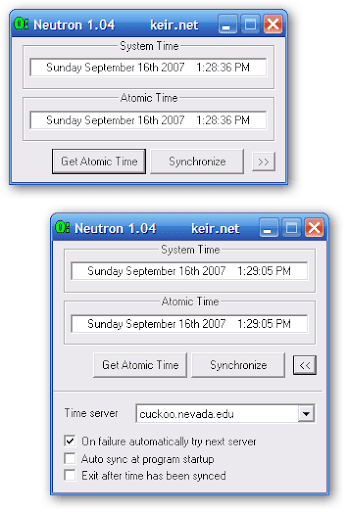
Favorit saya adalah Neutron, yang bisa diunduh di http://keir.net/download/neutron.zip.

Neutron is a very simple and small time synchronizing program that retrieves the accurate time from one of several specialized time servers on the Internet. Once the network time has been retrieved the program can set your computer's clock to match it.

Options in the program enable you to automatically obtain the time from the time server and set your clock appropriately at program startup. It is also possible to have the program automatically exit after the time has been set and so is ideal for placing a shortcut in your Startup folder to sync your clock when your computer is started.

Neutron uses the standard Time protocol (UDP port 37). See RFC 868 for more details. The time retrieved from the network time server is given as the number of seconds since midnight on January 1st 1900. Since the protocol only allows accuracy down to the second you may not get the most accurate time possible but it is usually good enough to always be within about half a second of "true" time. Network latency is accommodated in the calculations involved in setting your computer clock.


Cara kerjanya gimana?
Anda tinggal download file programnya, terus jalankan dengan syarat anda harus connect ke internet. Klik Get Atomic Time. Pilih Synchronize. Beres.... waktu anda sekarang sudah sesuai standar Internasional.

Senin, 28 April 2008

Eh, Speedy dah Bisa Akses Blogspot yah...

Iseng-iseng saya connect ke internet via Speedy, trus masuk ke browser dan kubuka url blog kesayanganku. Eh, ternyata dah bisa akses. Sejak kapan ya, seingatku kan kemaren-kemaren gak bisa akses blogspot lewat speedy.
Ya akhirnya posting ini yang muncul...

Jumat, 25 April 2008

NUPTK (Nomor Unik Pendidik dan Tenaga Kependidikan)

Sempat mumet juga ketika ditanya teman-teman guru tentang NUPTK. Mau ngecek kemana wong website-website yang nyediakan info itu lagi down semua. Akhirnya pagi-pagi dapat pesan dari operator jardiknas, bahwa data NUPTK bisa dipantau di sini...
http://www.sim-nuptk.info/content.php?pageid=4
Terima kasih untuk operator yang kasih info ini.

Kamis, 24 April 2008

Manfaat PIN Terbalik

Saya hanya melanjutkan pesan berantai yang saya terima di offline message saya.

Jika anda sedang terancam jiwanya karena dirampok/ditodong seseorang untuk mengeluarkan uang dari atm, maka anda bisa minta pertolongan diam-diam dengan memberikan nomor pin secara terbalik, misal no asli pin anda 1254 input 4521 di atm maka mesin akan mengeluarkan uang anda juga tanda bahaya Ke kantor polisi tanpa diketahui pencuri tsb.Fasilitas ini tersedia di seluruh atm tapi hanya sedikit orang yang tahu tolong kasih tahu kepada yang lain.

Shalat Yukk!!!